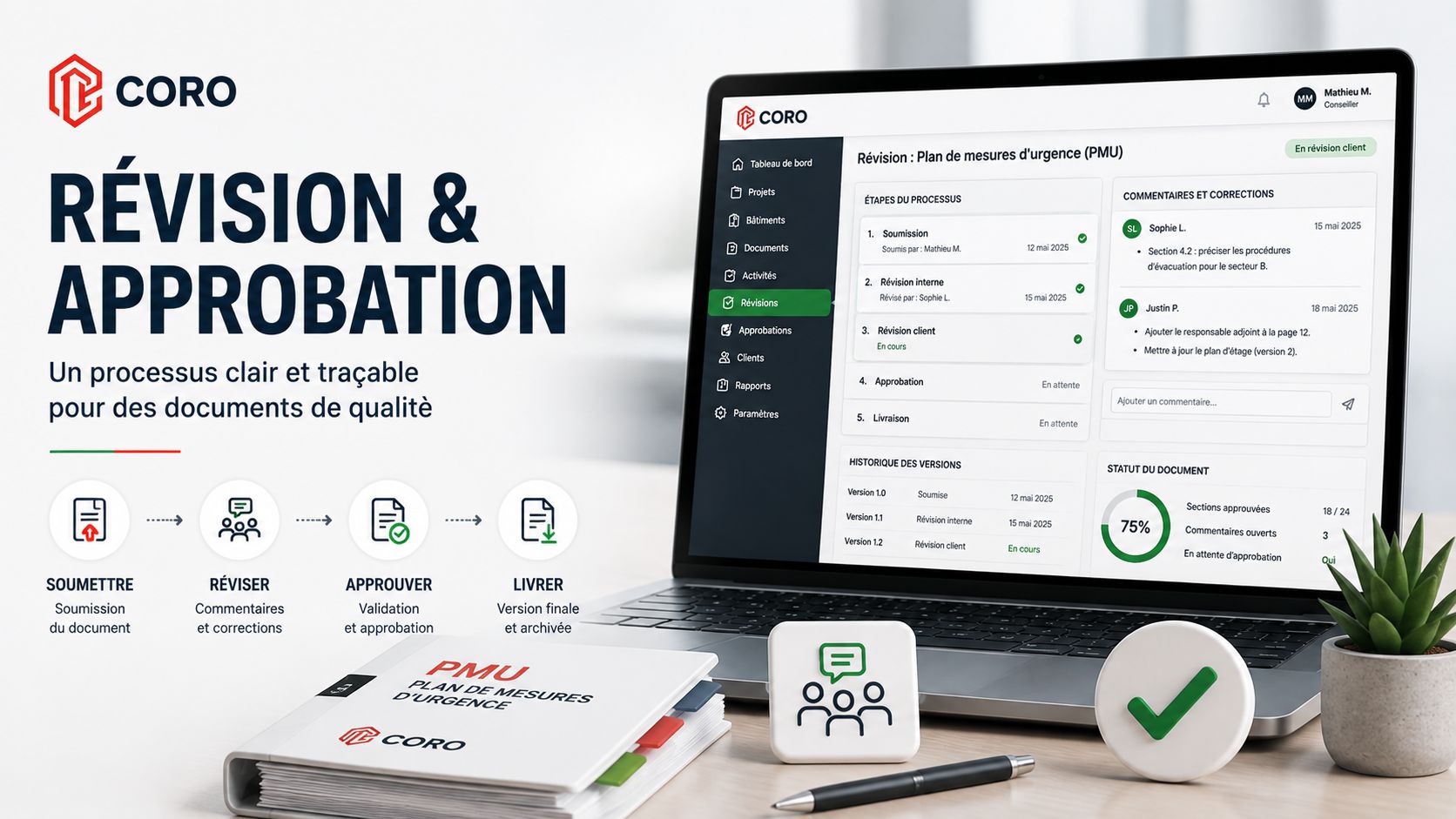
Producing a professional document does not necessarily end when the consultant saves the last modification. Before a plan can be considered final, it may still need to be submitted to the client, reviewed, commented on, corrected and submitted again. When those exchanges rely mainly on emails, attachments and multiple versions of the same file, the approval process can quickly become difficult to manage.
Document Delivery Is a Process Too
In an emergency management or compliance documentation mandate, a significant amount of work goes into information gathering, professional analysis and document production .
Once the first version has been completed, however, another phase begins: validation and approval.
Depending on the mandate, this process may involve several exchanges between the professional and the client.
Sending a document to the client should not necessarily be considered the end of the workflow. In many cases, it marks the beginning of a validation cycle that also needs to be structured.
Why Does Email-Based Review Become Difficult to Manage?
Email remains an excellent communication tool. It becomes less effective when it must simultaneously function as a version-control system, review platform and approval record.
A common scenario can look like this:
-
The consultant sends a PDF to the client.
A first version is submitted by email for validation. -
The client provides several comments.
Some may appear in an email while others are added directly to the PDF. -
A revised version is produced.
The consultant must determine which comments have been addressed. -
The document circulates again.
A second round of corrections may be requested. -
Several versions begin to coexist.
The team must then determine which file represents the latest valid version.
None of these steps is problematic on its own. Complexity appears when they begin to accumulate.
The Main Risk: Losing the Context of the Review
When feedback is provided, several pieces of information become useful:
- which version of the document was being reviewed;
- who submitted the comment;
- what change or clarification was requested;
- whether the correction has been completed;
- whether the observation remains open;
- which revised version was subsequently submitted;
- whether that version was ultimately approved.
When this information is distributed across several emails, attachments and conversations, reconstructing the history can become time-consuming.
Centralize the Review Process in a Client Portal
A client portal provides a dedicated environment where clients can access the documents and information associated with their organization or buildings.
The objective is not simply to replace a PDF attachment with a hyperlink.
The real value appears when the portal becomes part of the document workflow itself.
Dedicated Access
Clients access their own environment instead of managing a collection of separately transmitted documents.
Contextualized Documents
Each document remains associated with the relevant client, building and mandate.
Structured Review
Feedback and decisions can remain connected directly to the approval workflow.
Visible Status
Both the consultant and client can more easily understand where the document stands in its review cycle.
Apply the Same Review Principle Internally and With the Client
Before a document reaches the client, an organization may already use an internal review process.
The consultant submits the document to a colleague, the reviewer provides observations, the document may be returned for corrections and then resubmitted until it receives internal approval.
Client validation can follow a similar principle.
This creates two complementary layers of control: professional quality assurance within the organization and client validation before final delivery.
The Client Review Cycle, Step by Step
In a structured workflow, the client review process can be represented as follows.
-
The document is submitted to the client
The client accesses the version presented for review within their dedicated environment. -
The client reviews the document
The content is verified and the client determines whether changes are required. -
The client approves or returns the document
If corrections are required, observations are returned to the consultant. -
The consultant processes the feedback
Necessary changes are made to the document. -
A revised version is resubmitted
The corrected document re-enters the client review cycle. -
The client provides final approval
Once the corrections are satisfactory, the document can move toward its final version.
Every Observation Should Be Trackable Until Resolution
One of the challenges of document review is determining whether every requested change has actually been addressed.
In a structured process, an observation can be treated as an action to resolve rather than as a simple comment.
| Stage | Question it answers |
|---|---|
| Observation created | What needs to be reviewed, clarified or changed? |
| Observation open | Does this request still require action? |
| Correction completed | Has the requested modification been made? |
| Observation addressed | Does the consultant consider the request resolved? |
| Resubmission | Can the client now verify the correction? |
This approach preserves the connection between the original request and the action taken in response.
A Client Return Is Not a Failure of the Process
In an approval workflow, a document returned for correction should not necessarily be treated as an exception.
Review exists precisely because some information may need to be clarified, corrected or adapted before final approval.
A good workflow does not try to eliminate review cycles. It ensures that every return is clear, traceable and easy to process.
Several Correction Cycles May Be Required
Some documents may be approved during the first review. Others may require several cycles before reaching final approval.
The platform must therefore support the way review actually works rather than assuming that a single round will always be sufficient.
Reduce Confusion Between Document Versions
One advantage of a centralized document workflow is reducing the risk of several versions circulating simultaneously without users knowing which one should be considered current.
In a traditional process, file names can quickly begin to look like:
- ERP_Client_FINAL.pdf;
- ERP_Client_FINAL_V2.pdf;
- ERP_Client_CORRECTED.pdf;
- ERP_Client_FINAL_APPROVED.pdf;
- ERP_Client_FINAL_APPROVED_V2.pdf.
The issue is not the naming convention itself. The issue is that the document's actual status then depends on a human convention that different people may interpret differently.
A centralized workflow can instead connect the document's status directly to the approval process.
Give Clients Visibility Into Their Documents and Activities
The value of a client portal extends beyond document review.
Clients can also have a structured view of the environment associated with them, including buildings, documents and relevant activities.
This transforms the portal from a simple file repository into a dedicated access point for the ongoing document relationship between the client and the professional.
A Client Portal Does Not Replace the Consultant
As with document automation, technology should remain a support for the professional process.
A portal does not replace client conversations or the explanations required when a decision, recommendation or technical issue needs to be discussed.
Its role is instead to reduce administrative friction associated with:
- finding the correct version;
- identifying outstanding observations;
- knowing what still needs to be corrected;
- understanding the current approval status;
- accessing documents associated with a building;
- maintaining continuity throughout the mandate.
A Better Workflow Can Improve the Client Experience
Client experience does not depend only on the technical quality of the document being delivered.
It also depends on how easily the client can understand what is expected, review the material and follow the progress of the approval process.
Less Ambiguity
The client knows which document needs to be reviewed and what action is expected.
Greater Visibility
Returns, corrections and resubmissions become easier to follow.
More Continuity
Clients continue working within the same environment throughout the mandate.
Less Administrative Friction
Part of the coordination required for document approval becomes integrated into the workflow.
Connecting CORO's Four Operational Cycles
The client portal represents the final stage of a chain that begins long before a document is submitted for approval.
Document Production & Compliance creates and structures the deliverable.
Project & Mandate Management organizes the work required to produce it.
Performance & Objectives turns operational project data into management information.
Finally, the Client Portal extends the workflow to the person who must consult, review and approve the result.
From Project Kickoff to Final Client Approval
The value of an integrated platform comes from maintaining continuity between these stages.
The same mandate can progress from initial creation through production, internal review and client validation without each stage becoming a completely disconnected process.
A client portal should not simply be the place where the final result of a mandate is deposited. It can become an active component of the production, review and approval lifecycle.
FAQ — Client Portals and Document Approval
What is a client document portal used for?
A client portal centralizes access to the documents and information associated with a client. When integrated into an approval workflow, it can also structure reviews, feedback, corrections, resubmissions and final approvals.
Can a client request corrections?
Yes. In CORO, the client review workflow allows a document to be returned to the consultant when corrections are required and resubmitted once those changes have been completed.
Can a document be returned more than once?
Yes. Some documents may require several review cycles. The workflow can therefore support returns, corrections and resubmissions until final client approval is obtained.
What is the difference between internal review and client review?
Internal review focuses primarily on professional quality control before the document is presented externally. Client review then allows the organization receiving the document to verify relevant information, request adjustments and provide final approval.
Why centralize client observations?
Centralizing feedback makes it easier to track correction requests, determine which observations have been addressed and avoid reconstructing the review history from multiple email conversations.
Does a client portal replace communication with the consultant?
No. The portal structures certain administrative and document-related steps, but direct professional communication remains important whenever explanations, recommendations or decisions need to be discussed.
Can a client portal support multiple buildings?
Yes. CORO can structure client access according to the buildings and information associated with each user, allowing organizations with multiple sites to work within the same portal environment.
Extend the CORO Workflow to Your Clients
Centralize document access, reviews, feedback, corrections, resubmissions and approvals within a client environment connected to your document-production process.
Discover the CORO Client Portal